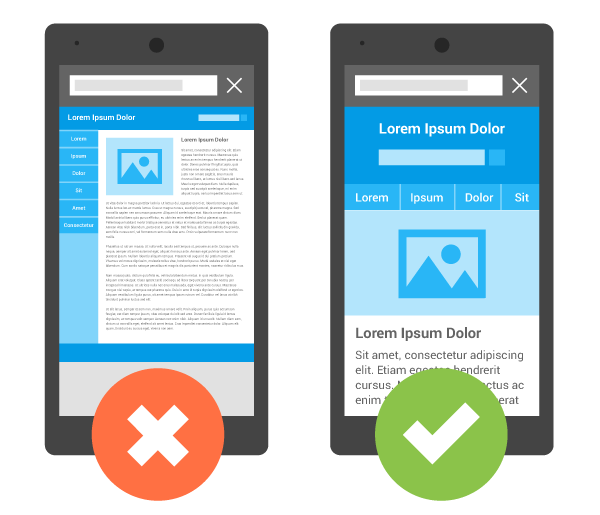
Why do You Need a Website for Your Small Business?

October 12th, 2010 • By: Top Level Web Design

The impact of the Internet on small businesses is huge. If you have a business, small or large, even if you don’t think your service or products can be sold online, you should have a website. Period.

More than 100 million shoppers are now online, purchasing everything from books to computers to cars to real estate to anything else, you name it. You should, at the very least, have a presence on the web so customers, potential employees, business partners and perhaps even investors can quickly and easily learn more about your business and the products or services you have to offer.

  • Provide more information to your clients in a better way

Having a website is definitely helpful in marketing your services. If you have visual examples of what you do, a website will act as a portfolio and introduce your work to prospective clients. Your website is just like an online brochure to your potential clients. You can direct your clients to your website for more detailed information, which is more effective and efficient than delivering a paper booklet. In addition, you save money on printing marketing materials.

  • Reach more potential target customers

Your business website is online and everybody can visit it at anytime from anywhere in the world. Anybody visiting your website can be your potential client. You need to make your website more visible and attractive to your visitors. How can you do that? With proper search engine optimization, your website will have a higher Google page rank. Your site will be displayed on top of your competitors when potential clients search your products through search engines such as Google or Yahoo! With a professional and user-friendly web design, your visitors will stay at your website for longer time. Research has shown that the more time visitors spend on your site, the higher the possibility they will buy your services or products.

  • Learn more about your target customers

You can use web analytic software to keep track of your visitors. For example, you will be able to find out where are they from, how they found your website, what information they are looking for, how long did they stay on your site, how often do they come back, … etc. Based on the intelligence analysis, you can fine tune your website and improve your services to better meet your clients’ needs.

  • Interact with your existing and potential clients virtually

What’s the best way to retain your clients? – By interacting with them, by building personal relationships with them. That’s why those social networking websites (FaceBook, Twitter) are becoming more popular in the mainstream. Small business owners can combine a blog or forum into their website to get feedback for services from clients directly. You don’t need to meet them in person in order to build a relationship with them. Build a community for your clients and they will become loyal customers.

  • Keep your competitive advantage

Simply put, if you don’t have a website, you are losing business to your competitors that do.

  • A website is not enough, you need a professional website for your small business

Your website speaks volumes about your business. You must have a professional-looking website if you want to be taken seriously by potential clients. With a well-designed professional website, your little operation can project the image and professionalism of a much larger company. Since many consumers now search for information online prior to making a purchase decision in stores, your website may be the first and last chance you have at making a good impression on a potential buyer.

Research indicates that 78% of people look online for local service providers. Having a website nowadays is imperative for all businesses. Many small business owners understand this. However sometimes it is overwhelming to deal with all the technical terms and the processes of designing a website.  As a small business ourselves, Top Level Web Design understands your needs and challenges. That is why we have come up with a $499 all-in-one website design solution.

Our website design packages include everything you need to build your online business presence. From Search Engine Optimization (SEO), setting up emails, to hosting, purchasing domain names and maintaining your website, our packages include it all.

If your business is not online or you have an outdated website, but you don’t have the time and budget for a long and expensive web design project, then Top Level Web Design is the perfect solution for you. We design and create affordable yet professional websites especially for small businesses and individuals.

You can take control over your own website. No more waiting for your IT guy, or web design company to make small changes or updates to your site.

With our custom designed website, you will be able to add news, change all the content on your web pages, upload photos, and even maintain your own blog!

Let’s get started! Submit your web design request form now!

  • RSS
  • Digg
  • del.icio.us
  • Google Bookmarks
  • Yahoo! Buzz
  • Technorati
  • MySpace
  • StumbleUpon
  • LinkedIn
  • email
  • Twitter
  • Facebook

How to Choose a Good Domain Name for Your Small Business?

October 6th, 2010 • By: Top Level Web Design

Having a good domain name is one of the most important parts of starting your web presence. A domain name is your own unique identity, so think of one that is easy to remember and relates to your small business.

Below are some tips on how to choose a good domain name for your small business.

  • Register a domain name that is the same as your business name

Ideally, you should use your business name as your domain name. For example, if you have a business named SmallBiz Consulting, you first choice should be SmallBizConsulting.com, since people will easily remember it. If this name is not available, choose something similar to your business name.

  • Stick with the .com domain name, only consider .net or .org as a second choice

The .com top-level domain name is the most popular extension in the world. If you chose a .net or .org for your business, your customers might forget that your domain name ends with .net; they might just assume that your business has a .com extension. When your clients search your business online, they might just type your domain name with .com – most likely they will be directed to your competitor’s website.

  • Consider a country-specific domain if you are running a local business (such as .us, .ca, .uk, .au, etc.)

If your website or business is only targeting the local community, such as a local restaurant or tutoring center, it makes sense to get a country-specific domain. You actually benefit from having such a local domain because your clients know that they’re dealing with a local business, which will make them more comfortable.

  • Shorter is better

Obviously, it is easy to remember and easy to type. The rule of thumb is no more than 20 letters.

  • Include the frequently-searched keyword in your domain

For example, our domain name TopLevelWebDesign.com, we use the key word, web design, as the most important part of our domain name. We know that when people are looking for a web design company online, they will type phases like “web design company in New York”, etc. There is Search Engine Optimization (SEO) advantage for using key words in your domain name.

  • Make it easy to spell and pronounce

You want people to talk about your business? You want to promote your business through word of mouth? Keep your domain name easy to spell and pronounce.  For branding purposes, keep it descriptive as well.

  • Consider registering multiple domains

To avoid confusion and keep the similar domains away from your competitors, it’s highly recommended to purchase both the singular and plural version of your domain name if applicable. For example, you can register both HappyTutors.com and HappyTutor.com. Set up your business website on HappyTutors.com and then redirect HappyTutor.com to HappyTutors.com. Therefore, if people happen to search HappyTutor.com, they will still be directed to your website.

The main reasons for registering multiple domain names are:

  1. Protect your brand and online identity
  2. Drive more traffic to your website
  3. Increase search engine optimization

Last but not least, Act fast! Once you find a good domain name available, register it immediately before someone else grabs it.

  • RSS
  • Digg
  • del.icio.us
  • Google Bookmarks
  • Yahoo! Buzz
  • Technorati
  • MySpace
  • StumbleUpon
  • LinkedIn
  • email
  • Twitter
  • Facebook

Integrate a Blog into Your Small Business Website

August 10th, 2010 • By: Top Level Web Design

Because of community building and marketing capabilities, business blogging is becoming more popular than ever. A blog can be an effective tool for sharing information and expertise. A blog offers your small business a chance to build a sense of community. Blogs make it easy and quick for people to post, comment and update posts, making it easy for everyone to participate.

A blog can be a powerful marketing tool. A well-maintained blog does three important things for a small business website.

  • Attracts more traffic to your website since there is always fresh content on the site (if you update the content frequently)
  • Establish a relationship with visitors and build a climate of trust. Potential customers get to know more about you and your small business through your blog
  • Blogs are search engine friendly – Search engines like the chronicle structure and dynamic nature of blogs

It is a smart choice for small businesses to integrate a blogs into their website to develop an interactive community around their products and services and find new customers via the search engines. Top Level Web Design utilizes this blog to provide more value-added information to help small business owners develop their online strategies.

Some of our custom web design and hosting packages include a Blog component. Based on the nature of your business, you can also easily transfer a blog into an archive page or a knowledge base for your small business website.

  • RSS
  • Digg
  • del.icio.us
  • Google Bookmarks
  • Yahoo! Buzz
  • Technorati
  • MySpace
  • StumbleUpon
  • LinkedIn
  • email
  • Twitter
  • Facebook

What’s Content Management System?

August 8th, 2010 • By: Top Level Web Design

A Content Management System (CMS) system is a web system designed to simplify the publication of web content to web sites and mobile devices, in particular, allowing content creators (website owners) to submit content without requiring technical knowledge of HTML or the uploading of files.

Simply put, a Content Management System (CMS) is a software system which provides website authoring and administration tools designed to allow users with little knowledge of web programming languages or markup languages to create and manage the site’s content with relative ease.

A Content Management System allows non-technical users to make changes to a website with little training. It is primarily a Web-site maintenance tool for non-technical administrators.

Most web design companies charge a lot of money for a fully functional Content Management System. Most cheap web design packages do not include any Content Management System. Sometimes you might need to pay a monthly fee in order to use a Content Management System. However, here at Top Level Web Design, all of our web design packages include a user-friendly CMS for our clients without extra charges.

Today’s small businesses need the ability to control their content just as much as larger companies. You don’t need an advanced design, but you do need a website that allows you to change the text on all the pages, the ability to add photographs to your pages and embed code from outside sources such as Facebook or Twitter and other social networking sites.

We will design and develop your website on a powerful CMS. You can update your website content at your convenience from anywhere with an Internet access. You will have full control over your site and no programming skills are needed! We will also provide you with a step-by-step User Guide explaining how to update your website with CMS. We even provide tutorial videos to help you manage your web content.

  • RSS
  • Digg
  • del.icio.us
  • Google Bookmarks
  • Yahoo! Buzz
  • Technorati
  • MySpace
  • StumbleUpon
  • LinkedIn
  • email
  • Twitter
  • Facebook

What’s Search Engine Optimization?

August 1st, 2010 • By: Top Level Web Design

Search engine optimization (SEO) is the process of improving the visibility of a website or a web page in search engines (Google, Yahoo! or Bing) via the “natural” or unpaid (“organic” or “algorithmic”) search results. Other forms of search engine marketing (SEM) target paid listings. In general, the higher the positioning of your website displaying on the search result page, and the more frequently a website appears in the search results list, the more visitors it will receive from search engines.

Search engine optimization affects only organic search results, not paid or “sponsored” results, such as Google AdWords.

As an Internet marketing strategy, SEO considers how search engines work and what information people search for online. Optimizing a website may involve editing its content and HTML and associated coding to both increase its relevance to specific keywords and to remove barriers to the indexing activities of search engines. Promoting a site to increase the number of outbound links or inbound links, is another SEO tactic. Therefore it is an important strategy to exchange links with other similar websites.

SEO is not a rocky science. The good practices outlined below will make it easier for search engines to both crawl and index your website content.

  • Include the target key words in your domain name
  • Include the target key words in the page title
  • Use the target key words in your content
  • Update your website content frequently
  • Exchange links with other quality websites
  • Post your website in related business directories
  • Register your website on social networking sites such as Facebook and Twitter

Search engine optimization is often about making small modifications to parts of your website. When viewed individually, these changes might seem like incremental improvements, but when combined with other optimizations, they could have a noticeable impact on your site’s user experience and performance in organic search results.

  • RSS
  • Digg
  • del.icio.us
  • Google Bookmarks
  • Yahoo! Buzz
  • Technorati
  • MySpace
  • StumbleUpon
  • LinkedIn
  • email
  • Twitter
  • Facebook